
Please follow the following steps :-
1) Login to Plesk control panel.

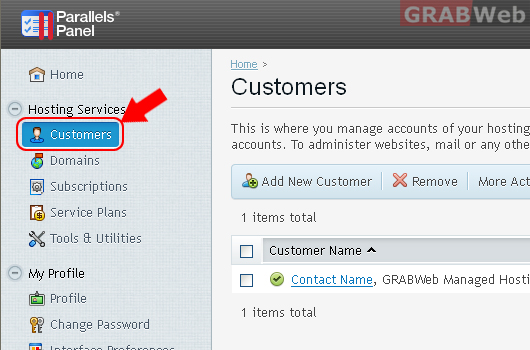
2) Click on "Customers"
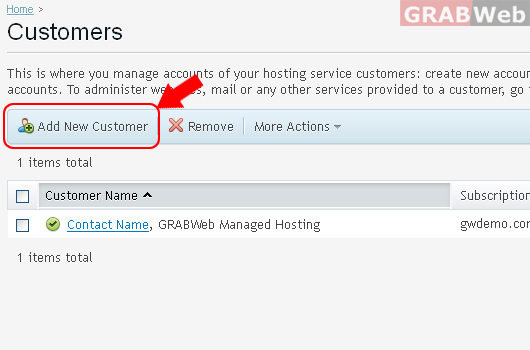
3) Click on "Add New Customers"
This is where you sign up a new customer to your hosting services. By this sign-up, you create a customer account in the Panel and a subscription to one of your hosting plans and, optionally, add-ons. The subscription can also provide a completely custom set of resources and services, not bound with any plans — for this, select 'None' next to the Service Plan.
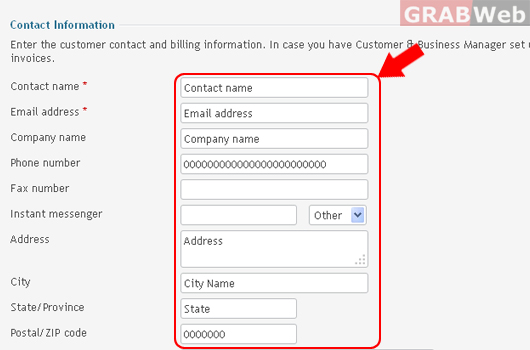
4) Fill the "Customer Information"
Enter the customer contact and billing information. In case you have Customer & Business Manager set up with the Panel, this information will be used in the customer invoices.
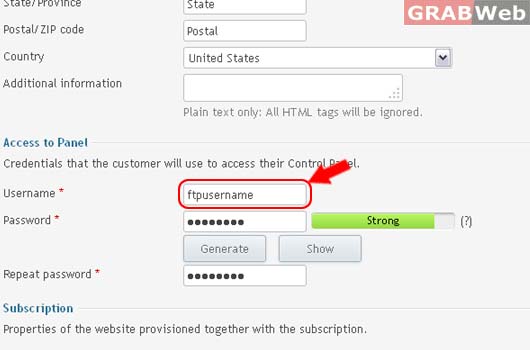
5) Fill the details to "Access to Panel."
Credentials that the customer will use to access their Control Panel.
Strongly recommend to Generate Strong password by Click Generate Button
To show password by Click Show Button.
6) Properties of the website provisioned together with the subscription.
"Check box Create subscription for the customer"
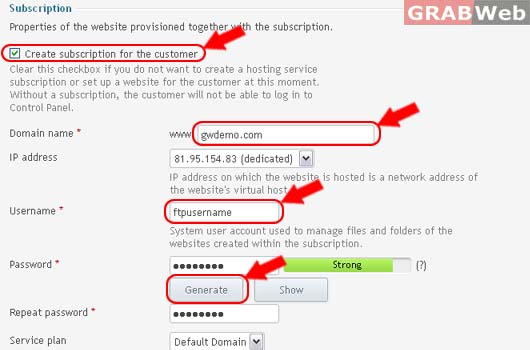
7) Click Ok.
Information: Customer Contact Name was created.
