
To Manage Secondory Domains,
Please follow the following steps:-
1) Login to Plesk control panel.
2) Click Domains from the list side.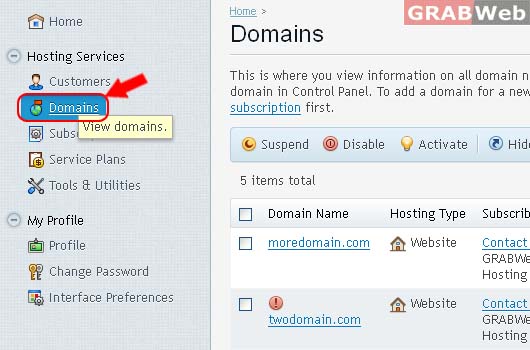
This is where you view information on all domain names registered in the system. You can also view a subscription or a webspace that contains a certain domain in Control Panel. To add a domain for a new customer, create a customer account first. To add a domain for hosting your own website, create your own subscription first.
3) To Suspened Domain, Cilck on Check box of domain and Click on Suspend.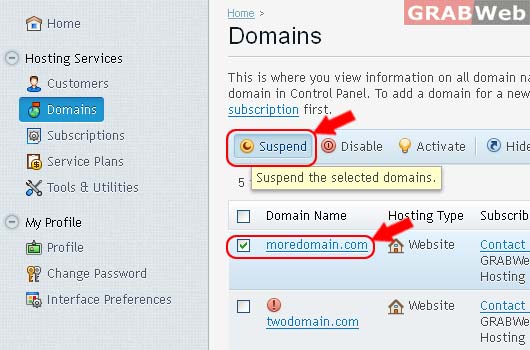
Information: Selected domains were suspended.
3) To Disable Domain, Cilck on Check box of domain and Click on Disable.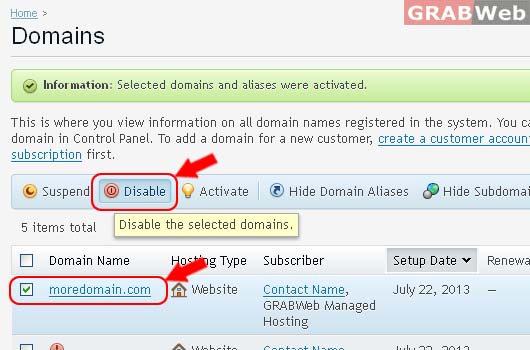
Information: Selected domains were disabled.
4) To Activate Suspended Domains and Subdomains, Cilck on Check box of domain and Click on Activate.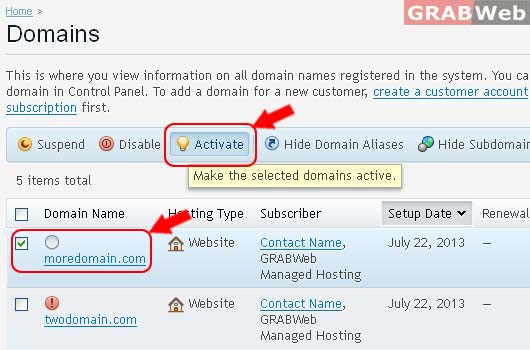
Information: Selected domains and aliases were activated.
5) To Hide Domain Aliases, Click on Hide Domain Aliases Button.
6) To Hide Subdomains, Click on Hide Subdomains.
