
To enable Web Statistics in Plesk 10, please follow the following settings:-
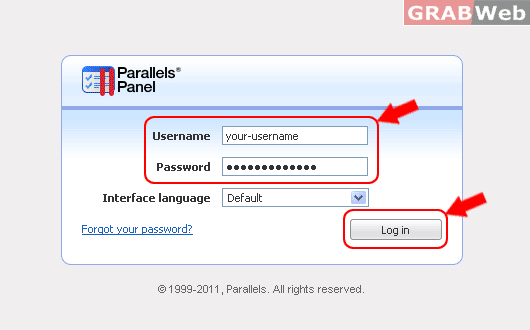
1) Login to Plesk control panel.
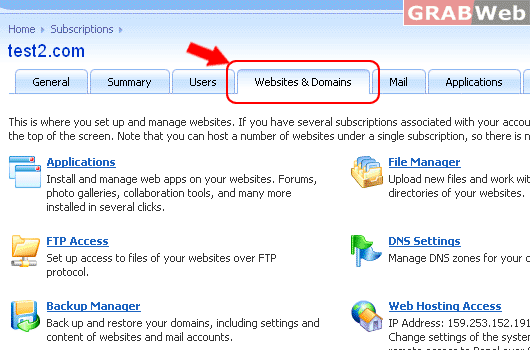
2) Click on "Websites & Domains".
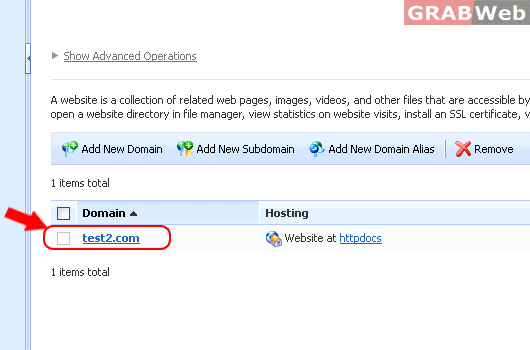
3) Click on "Domain Name"
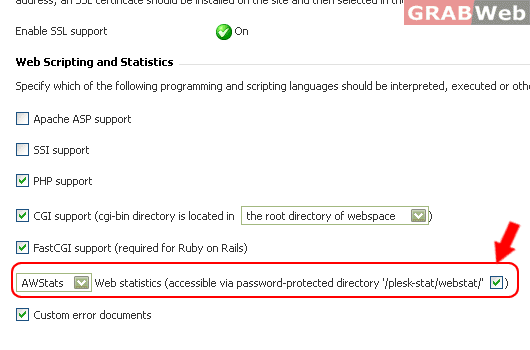
4) Click on "Check Box"
5) Click Ok.
To enable Web Statistics in Plesk 10, please follow the following settings:-
1) Login to Plesk control panel.
2) Click on "Websites & Domains".
3) Click on "Domain Name"
4) Click on "Check Box"
5) Click Ok.
To Enable PHP safe mode in the Plesk, please follow the following settings:- 1) Login to Plesk...
To enable PHP module support, Please follow the following settings:- 1) Login to Plesk control...
To change Hosting type of Domain In Reseller Account, please follow the following settings:- 1)...
To install SSL certificate for your websites from Plesk, please follow the following steps:- 1)...
SSL employs a public key - private key system for its encrypting. The public key is used to...
