Set up accounts for users who can host personal web pages on your websites.
Please follow the following steps:
1) Login to Plesk control panel.

2) Click on Websites & Domains.

3) Click on Domain Name as marked in RED.

4) Click on Web Users.
View the list of users having personal web pages on your websites, and manage their accounts. Web users are limited user accounts that cannot log in to the Panel; they can only access a directory under one of your sites and host their sites there. Web users' sites can have addresses like www.example.com/~username.

5) Click on Add New User
Add a new web user account. 0 created / 0 allowed.

6) Enter the requied details as marked in RED.

7) Click Ok.
Information: The web user account webuser was created.

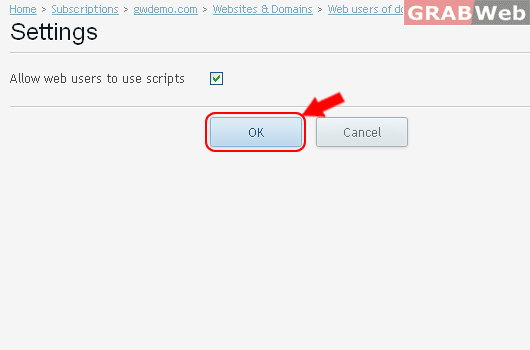
8) Click on Settings.

9) Click on Allow web users to use scripts

10) Click Ok.
Information: Settings of web user accounts under the domain gwdemo.com were changed.
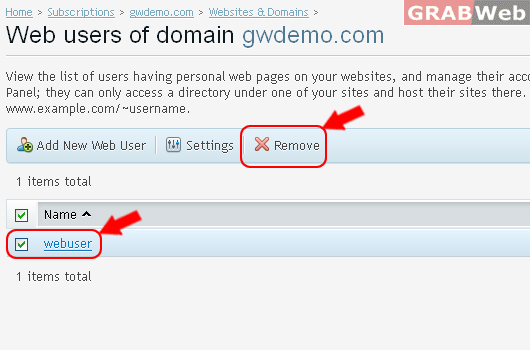
11) To Remove Web User, Click on Web username from the list and click on Remove.
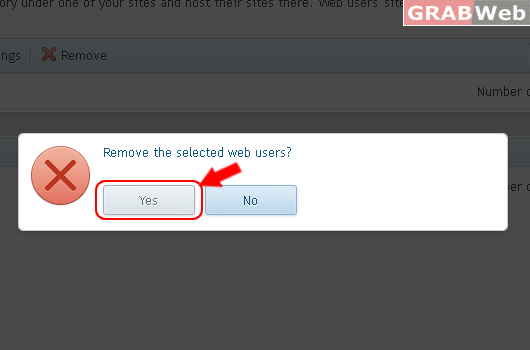
12) Click Yes.